









10Life Financial Limited
Enquiries: enquiries@10life.com
Hotline: (852) 3705 1599
Address: 16/F Greatmany Centre, 109-115 Queen’s Road East, Wan Chai, Hong Kong



What is Taxeasy?
Who can apply for “eTax”?
What online services does a Tax e-Account provide?
What are the benefits of filing tax returns electronically?
“eTax” account opening steps
After successfully opening an account, how do I log in to “eTAX”?
How to use online e-filing?
Make good use of the “three tax-deductible essentials” to save tax while also enjoying protection


Every year at tax filing time, you need to keep an eye out for your tax return, fill it in and send it back before the deadline. If you wish to object to an assessment, the back-and-forth process can be even more troublesome, and the complicated procedures are always a headache. Is there a simpler and more convenient way to file your taxes? In fact, the Hong Kong Inland Revenue Department has already launched the “eTAX” online platform, allowing everyone to file taxes electronically online and enjoy an extra one-month grace period. But how do you apply for e-filing? How do you complete your tax return online? And what should you pay attention to when filling in the tax return online? This time, 10Life has prepared a detailed eTAX online tax filing guide, covering everything from account opening and application to filing steps, to show you how to use “eTAX” and help you easily handle your tax matters.
What is Taxeasy?
“eTax” is the online tax filing platform launched by the Inland Revenue Department of Hong Kong. Once you have set up an account, you can handle tax matters online, such as filing tax returns, paying tax, and checking your own tax status.
Who can apply for “eTax”?
Although electronic tax filing is convenient, not everyone is eligible to apply for a “Tax e-Account”. Only those who meet the following conditions may apply:
Once you have confirmed that you meet the above conditions, you may prepare the relevant documents and submit your application.
What online services does a Tax e-Account provide?
The “eTAX” account is comprehensive and can help taxpayers handle a wide range of tax matters. The services cover:
What are the benefits of filing tax returns electronically?
E-filing tax returns through the “eTAX” platform not only makes the filing process simpler, but also offers the following benefits, which you may wish to consider applying for:
“eTax” account opening steps
To apply for an eTAX account on the “eTAX” platform, simply complete the following four main steps:
1. Apply for an “eTAX” password: Enter your identity card number and tax file number (10 digits). An activation password will be sent by post to your correspondence address within 2-7 working days
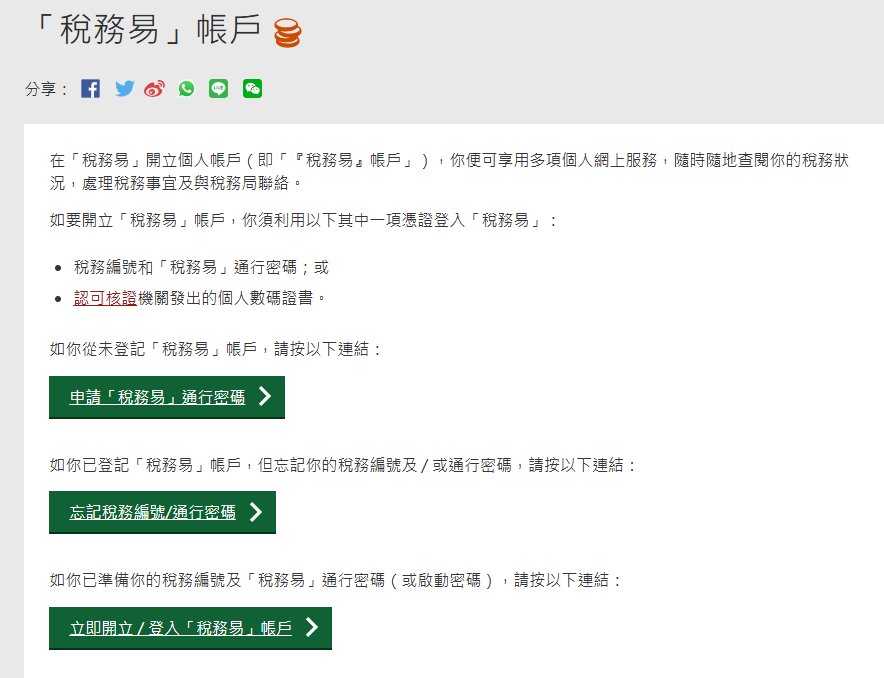
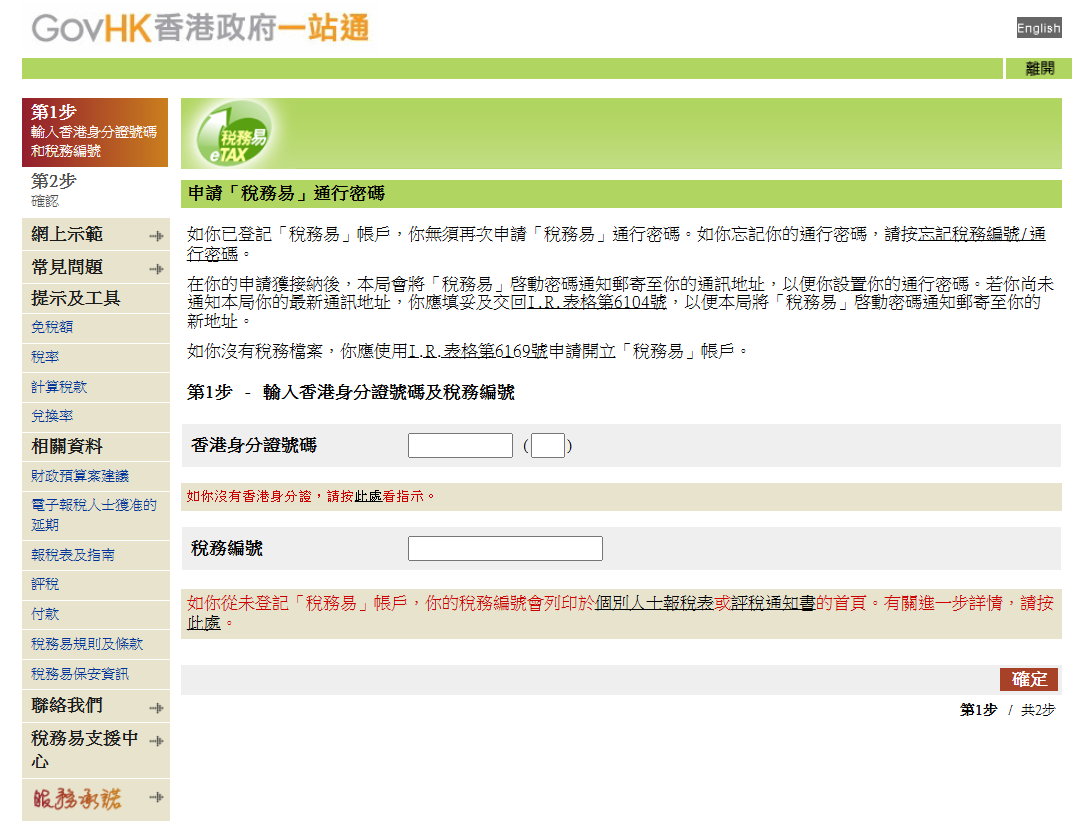
2. Open an account: After receiving the activation password, you must complete registration on the eTAX website within three weeks. Follow the website instructions, read and agree to the relevant terms, then click “Continue” and set your tax file number and password
3. Complete user details: Fill in your personal information, password hint, etc.
4. Select electronic documents: Choose to receive documents electronically
5. Verify and complete registration: Check that all information is correct and complete the account opening process
After successfully opening an account, how do I log in to “eTAX”?
When logging in to “eTax” for the first time, you may follow the steps below:
1. Go to the eTax homepage and click “Login”
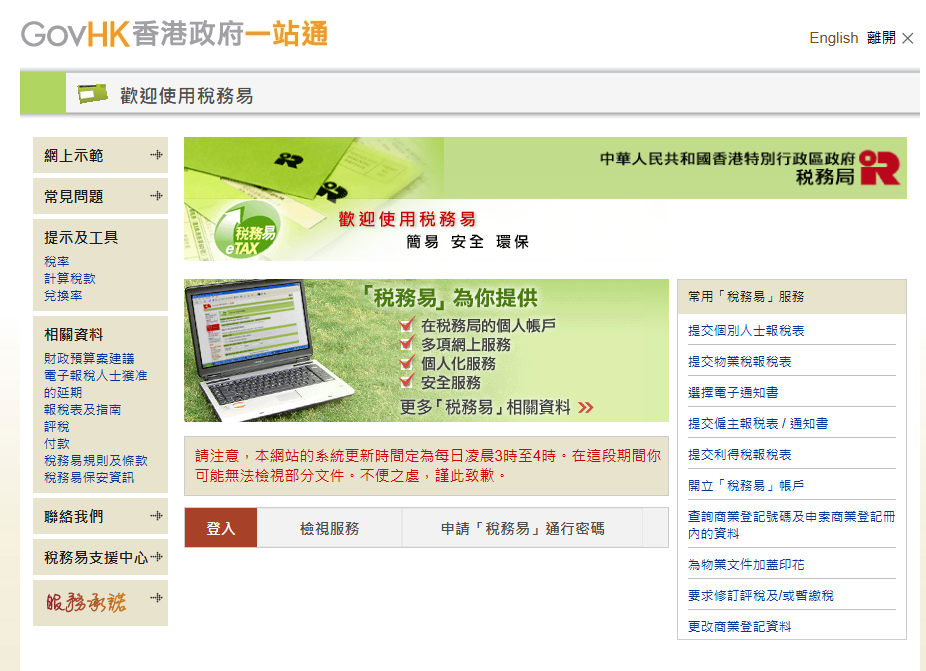
2. Enter your tax reference number and the access code printed on the activation password notice to verify your identity
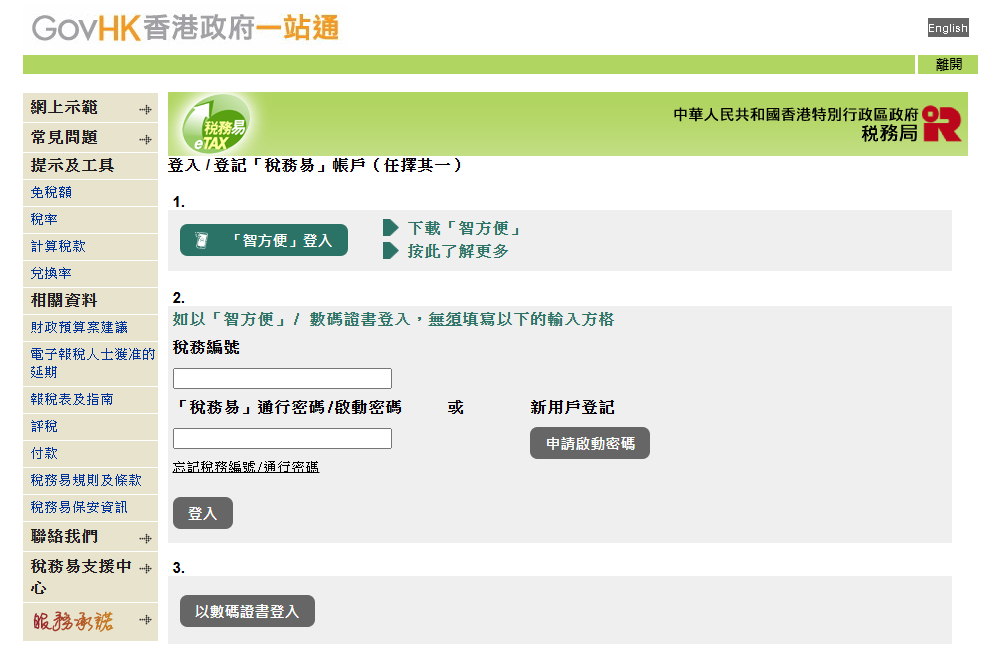
3. Set up your tax reference number and a self-selected password (8 to 16 letters or numbers)
4. Provide your personal and contact details
5. Verify the information entered
6. The system will confirm the user’s identity
7. Once completed, you can begin using the various tax services. If you need to amend your personal details, you may update them on the “User Profile” page under “Related Information”, or select the required service on the “Online Services” page. Under “Tax Position”, you can view details of tax returns, notices of assessment and Tax Reserve Certificates (if any). In the “Message Box”, you can view eMails and alerts.
How to use online e-filing?
Submitting a tax return online is very straightforward. Simply follow the steps below to complete your tax filing with ease:
1. After logging in, click “Tax Position”
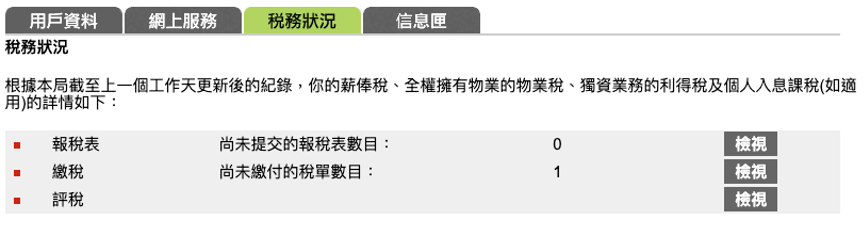
2. The system will display tax returns that have not yet been submitted. Click “View” to check them
3. In the unsubmitted tax return, click “File Tax Return” to start completing the online tax return form
4. After reading the important notes, the system will automatically fill in your personal details. Check the information and make any necessary changes, then click “Continue”
5. The main sections of the tax return will be displayed. Select the applicable sections and complete them, then click “Continue”
6. When you reach the Salaries Tax section, fill in your employment details and income amount, then click “Continue”
7. When you reach the Allowances section, select the applicable allowances, then click “Continue”
8. Fill in the details of each allowance, then click “Continue”
9. Finally, review the information you have entered, including the income amount and allowances, and then submit it
Make good use of the “three tax-deductible essentials” to save tax while also enjoying protection
During the tax filing process, many people may notice deductible items. Among them, Qualifying Deferred Annuity Policies (QDAPs, tax-deductible annuity), Tax Deductible Voluntary Contributions (TVC) and Voluntary Health Insurance Scheme (VHIS) are what are commonly known as the “three tax-saving essentials”. Combined, they can provide taxpayers with tax deductions of up to HK$68,000 or more each year. A Qualifying Deferred Annuity Policy (QDAP) alone offers an annual tax deduction of up to HK$60,000, helping to ease your tax burden while preparing for retirement in the future. If you would like to know more about tips for choosing tax-deductible annuities and key considerations, feel free to call or WhatsApp 37051599 to enquire with 10Life insurance advisers.
Further reading:
[2025 Complete Guide to Tax-Deductible Annuities] Analysis of annuity tax-deduction products (10-year annuity term) — see how annuities help you save tax and which provider offers the highest return!
[Tax-saving essential] How long does a tax-deductible annuity take to break even? How can you maximise your tax deductions?
[2025 Tax Allowances] What are tax allowances? See personal allowances and 8 deduction methods
[First-time tax filing guide] How do you complete the tax return? See the filing steps and an easy-to-follow guide
[Tax payment guide] How much annual income do you need before you start paying tax? See the Hong Kong salaries tax calculation guide
Last updated: 1 January 2026


This English version of this article has been generated by machine translation powered by AI. It is provided solely for reference purposes. In the event of any discrepancy or inconsistency between this translation and the original Chinese version, the Chinese version shall prevail.
Last updated: 7 Aug 2026

Our team of professional content researchers focussing on insurance
Our team of professional content researchers focussing on insurance
10Life Product Comparison and 10Life Insurance Ratings are developed by 10Life Financial Limited, an authorised insurance broker company licensed with the Insurance Authority under License Number FB1526. 10Life Product Comparison and 10Life Insurance Ratings are developed for generic customer segments using mathematical calculations based on product information, facts and data, and are not influenced by any partnerships with or fees received from insurance companies. Any information on 10Life Platform ("10Life Information"), including but not limited to Product Comparison, Product Ratings, Blog Articles are intended for general education purpose and reference only. None of the 10Life Information is intended, nor should they be considered or relied upon, as regulated advice, insurance, financial, investment or professional advice, recommendation, approval, endorsement, invitation or solicitation in respect of any insurance, financial or investment products. 10Life Information does not take into account your individual needs. Reading 10Life Information should not be considered as conducting a suitability assessment, and is not sufficient to form the basis of any decisions to purchase any insurance products. You should rely on information authorised by insurance companies, carry out your own research and/or seek independent advice from licensed intermediaries before purchasing any insurance products or making any insurance decisions. While reasonable effort is used when collecting, validating and updating 10Life Information from various channels, none of 10Life Group and its subsidiaries, affiliates, agents, directors, officers and employees will be responsible for any liability, claim or loss arising from or associated with you using 10Life Information. No warranty, representation or guarantee is given by 10Life Group and its subsidiaries on the accuracy, completeness and timeliness of the information. If you have any questions on 10Life Product Comparison and 10Life Insurance Ratings, please email us at enquiries@10life.com




 Talk to 10Life on WeChat

